

Stop losing customers to bad website design. Discover the exact system to plan your proposition, build your digital storefront, and launch a professional website that actually generates revenue.
Struggling to build a website? Discover the exact 5 steps to create a professional business website, attract more traffic, and increase your sales.
Introduction
Your website is the most critical asset your business owns. It operates as your 24/7 sales engine, capturing leads and building trust while you sleep. However, many founders make a critical mistake when building their first site. They jump straight into buying expensive design templates or hiring coding agencies before they even know what their business model looks like online.
In most cases, skipping the strategy phase leads to a beautiful website that makes zero money. To build a professional website, start by documenting your core strategy with a One Page Business Plan first. Once your foundation is set, you can naturally map out your content and choose the right technical platform. By following these exact steps, you prevent costly redesigns, reduce your dependency on word of mouth referrals, and launch a digital storefront that wakes up to new inbound inquiries every single morning.
The Resource Constraint Filter
If you do not have your Unique Selling Propositions (USPs) written down, pause your website project completely. Focus strictly on aligning your business plan and proposition first before spending a single dollar on hosting or design.
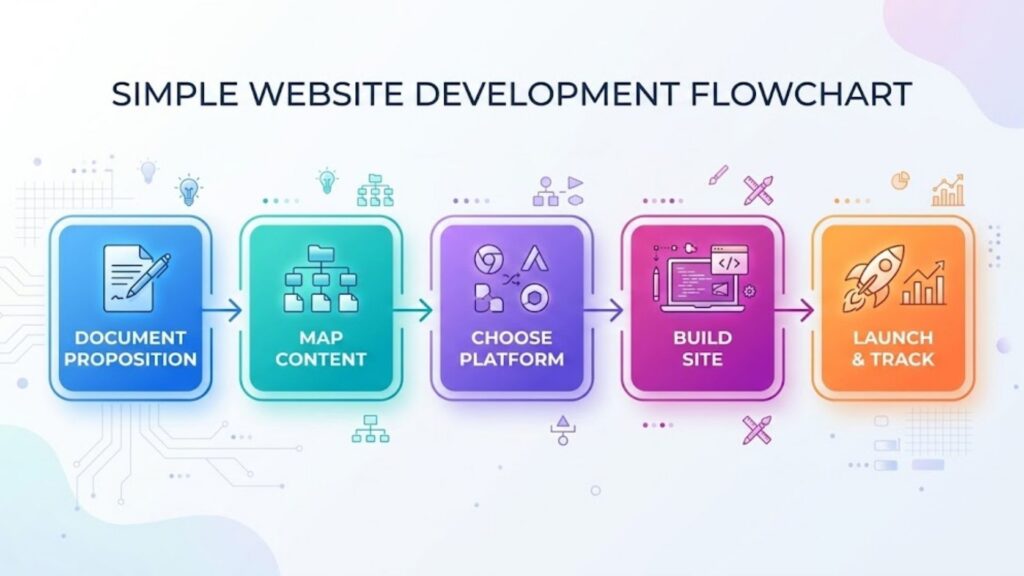
Recommended Order of Execution:
- Document your proposition.
- Write your content.
- Choose your platform.
- Build or delegate.
- Launch, track, and optimize.
Business Facts
- Exactly 75 percent of consumers will judge your company’s entire credibility based purely on your website design. A professional digital storefront instantly builds the trust required to close high-ticket sales.
Source: Stanford University Web Credibility Guidelines (https://credibility.stanford.edu/guidelines/index.html)
- 88 percent of online consumers will never return to a website after a single bad user experience. Poor usability or confusing navigation does not just frustrate visitors, it permanently drives potential revenue directly to your competitors. Source: Sweor First Impressions Web Design Statistics
(https://www.sweor.com/firstimpressions)
- Over 50 percent of all global web traffic currently originates from mobile devices. Launching a site that only looks good on a desktop computer is a massive mistake that automatically alienates the majority of your audience.
Source: Statista Mobile Internet Web Traffic Share (https://www.statista.com/statistics/277125/share-of-website-traffic-coming-from-mobile-devices/)
- 47 percent of users expect your website to load in two seconds or less. Slow-loading pages drastically increase your bounce rate, meaning potential customers will abandon your site before they even read your proposition.
Source: Google Mobile Page Speed Industry Benchmarks (https://www.thinkwithgoogle.com/marketing-strategies/app-and-mobile/mobile-page-speed-new-industry-benchmarks/)
Why Your Website Is Not Making Money
The real problem is treating your website like a digital brochure instead of an interactive sales tool. If your site only talks about how great your company is, customers will leave. Consider this common failure scenario: A founder spends $5,000 hiring an agency to build a stunning, animated website. However, they never clarified their USPs. The site gets traffic, but because the messaging is confusing, the bounce rate is massive, and zero leads are captured.
Your goal is to build a platform that solves the exact problems your potential customers are searching for, making them feel understood the moment the page loads.
The Website Creation Framework:
Here is how experienced operators approach digital builds. Think of it like building a house. The proposition is the foundation, the content is the framing, and the design is just the paint:
- Define the exact elements that are most important to your customer.
- Draft text and gather images that propel that story forward.
- Select a technical platform that fits your budget and skill level.
- Style the site cleanly to reflect your brand identity, and ensure the navigation is effortless.
- Connect your social channels and install analytics to track performance.
The 5 Professional Steps to Building Your Website
1. Document Your Proposition (The Foundation)
You cannot design a website if you do not know what you are selling. Have your business plan at the ready. Write down your Unique Selling Propositions (USPs) and define exactly how your business model translates to an online environment.
- The Benchmark: Write down the three most important elements your customer cares about. This will form the core message of your homepage.
2. Map Your Content and Visuals
Do not wait for a web designer to write your text. Create content around the exact questions and problems your customers are actively searching for. Then, find high-quality images that help propel the story forward. Have the text for your Home, About, Services, and Contact pages completely written in a plain text document before you buy a domain name.
3. Choose Your Platform and Hosting
Ideally, find a reliable hosting company and choose your software. For maximum control and SEO scaling, WordPress is widely considered the most helpful platform. For beginners who want an all-in-one solution, Wix or Squarespace are excellent options.
- The Cost Layer: DIY website builders usually cost between $20 and $50 per month. Standard WordPress hosting costs between $10 and $30 per month.
4. Build, Style, or Delegate
Once your platform is chosen, select a clean, modern template for styling. If you have the time, you can build this yourself using drag-and-drop tools. If you lack the time or technical confidence, delegate the work to a website development agency. A good rule is to expect professional agency build costs anywhere from $2,000 to $10,000, depending on your exact requirements.
5. Launch, Track, and Optimize
Set your website live. Connect the social media accounts your customers actually use. A smart approach is to immediately install tracking tools like Google Analytics to measure your performance. Add a tool like Yoast for SEO, optimize your content, and iterate on your business model based on user data.
- The Timeline: Give your site 30 to 60 days of consistent content updates before expecting to see initial organic traction.
3 Common Mistakes When Launching a Website
1. Ignoring Mobile Usability: Since over half of your traffic will come from phones, building a site that only looks good on a desktop is a massive mistake. Always test your site on a mobile device before launching.
2. Focusing on Yourself, Not the Customer: Your website should not just be a list of your accomplishments. In most cases, it needs to clearly explain how you solve the visitor’s specific problem within the first five seconds of them landing on the page.
3. Hiding the Call to Action (CTA): If a customer wants to buy from you, do not make them hunt for an email address. Every page should have a clear, visible button guiding them to the next step, whether that is a contact form or a checkout page.
The Decision: What to Do Next
If you are unsure what to do next, use this simple guide:
- If you have no budget and just need to test an idea, set up a professional Facebook Page today as a temporary validation layer.
- If you have a small budget and want to DIY, use a builder like Wix or Squarespace to launch a site this weekend.
- If you want complete control and long-term SEO power, find a hosting company and build a scalable site on WordPress.
- If you have a budget but zero technical time, delegate the entire project to a Web Development Agency while you focus on sales.
Real-World Example
David ran a specialized consulting business. Initially, he built a very complicated, expensive website full of heavy animations and dense corporate jargon. His site was incredibly slow to load, and it was nearly impossible to read on a mobile phone. Despite getting moderate traffic, he generated zero leads for six months.
He decided to strip it down and follow the framework. He rewrote his text to focus entirely on the customer’s pain points. He switched to a clean, fast-loading WordPress template and ensured his “Book a Consultation” button was highly visible on mobile devices. By making the site faster and the proposition clearer, David’s bounce rate dropped significantly, and he booked four high-ticket clients in the following 30 days.
Summary of the Best Website Platforms
| Platform Type | Best For (Scenario) | Typical Cost | Technical Skill Required |
| Social Page (Facebook) | Testing ideas with zero budget | Free | None |
| DIY Builders (Wix) | Fast launches with no coding | $20 to $50 / month | Low |
| WordPress | Full control and heavy SEO growth | $10 to $30 / month | Medium |
| Agency Build | Saving time and ensuring custom quality | $2,000 to $10,000+ | None (Outsourced) |
Expert Quote:
“Design is not just what it looks like and feels like. Design is how it works.”
- Steve Jobs
Here is how to create a good website for your business. To create a good website for your business, start by creating a business plan and writing down the most important elements for your customers. Next, generate content and select images that will engage your audience.
Then find a suitable hosting company, create a simple website or Facebook page, and choose a template for styling. Work with a website development agency if needed and set the website live. Connect your social media accounts and track your results and performance. Finally, continuously improve elements, update content, and add new valuable features to expand your website.
Steps to take to create a professional website for your business
- Create your business plan. Have your business plan at the ready.
- Check if how you can build your business model online.
- Write down your usp’s. Write down the most important elements for your customer. (proposition)
- Make content. Create subjects on topics that the customer is interested in. Craft some texts.
- Setup images. Find images that help propel the story forward.
- Find a hosting company.
- Work with a website development agency, if you want to delegate the work.
- Create a simple website for your business. Or a Facebook page. Something that your customers will use as a digital interaction point.
- Create a website. we think WordPress is very helpful.
- Choose a template (styling). Create or delegate website creation.
- Set it live.
- Improve elements, update content
- Connect the social media your customers use
- Track results and performance
- Add new stuff of value and expand
- Build traffic with SEO (Yoast), optimize your content
- Iterate on your business model (check earnings)
Final Thoughts and Your Next Steps
Building a professional website is the most critical step in establishing your digital authority. However, designing a site without a proposition is a guaranteed way to waste time. Document your business plan, map out your customer-centric content, and choose a platform that scales with your ambition.
Save this page and use it as a checklist before you buy a domain or hire an agency. A professional website performs best when connected to a broader marketing and growth strategy.
Every hour your business operates with a confusing website is another hour you are actively losing revenue to your competitors. Stop guessing and lock in your strategy right now. Before you spend a single dollar on hosting or a web designer, download our comprehensive Website Checklist to guarantee you do not miss a critical step.
Once your site is mapped out, explore our full Marketing Template to execute your digital strategy, or grab the Full Set of Premium Templates for Business Startup Bundle at Excellent Business Plans to build a foundation that generates revenue today.
Frequently Asked Questions (FAQ)
1. Do I need to know how to code to build a professional website? No. You can easily use modern website builders like Wix, Squarespace, or WordPress, which all feature drag-and-drop visual tools. However, basic coding knowledge is helpful if you want extreme control and custom features later on.
2. What pages should my business website have at a minimum? At minimum, your site should include a Homepage, an About page, a Services or Products page, and a Contact page. You should add a Blog or an FAQ page later to help communicate your value and improve your search rankings.
3. Is a Facebook page enough for a small business? This depends heavily on your target user. While a Facebook page is a great starting point for validating an idea with zero budget, it will only generate leads if your ideal customers actively spend their time on that platform. Furthermore, you do not own that digital real estate. Eventually, a smart approach is to build your own website so you have complete control over your customer experience and data.
4. How do I get more people to visit my new website? The most sustainable way to build traffic is through Search Engine Optimization (SEO). By publishing helpful blog posts and optimizing your content with tools like Yoast, you gradually increase your visibility on search engines like Google.
5. Should I build the website myself or hire a web development agency? This depends entirely on your budget and timeline. If you have more time than money, build it yourself using a template. If your business is already generating revenue and your time is better spent selling, delegate the build to an agency.
6. What pages should my website have? At minimum, include a homepage, about page, services or products page, and a contact page. Add blog, FAQ, or portfolio pages if they help communicate your value or improve customer experience.
7. How much does it cost to create a website? The cost varies widely based on features and design—ranging from free (using basic website builders) to several thousand euros for custom sites. Budget options work for personal use or small businesses, while custom builds suit larger or growing businesses.
References
- Stanford University. “Web Credibility Guidelines.” https://credibility.stanford.edu/guidelines/index.html
- Sweor. “First Impressions Web Design Statistics.” https://www.sweor.com/firstimpressions
- Statista. “Share of Website Traffic Coming from Mobile Devices.” https://www.statista.com/statistics/277125/share-of-website-traffic-coming-from-mobile-devices/
- HubSpot. “Lessons from Surprising Marketing Stats.” https://offers.hubspot.com/lessons-from-marketing-stats
Do you want to know if a website is the only thing you need? You might want download the online marketing template to have a good feel of all the moving parts of such a plan.