Overwhelmed by CRM options? This guide utilizes G2 data to compare the top 10 CRM tools for small businesses, helping you select the ideal fit.
Compare the top 10 CRM tools for small businesses in 2025. Our guide uses G2 data to review features, pros, cons, pricing, and implementation factors to help you grow.
Introduction: Beyond the spreadsheet
As your small business grows, managing customer relationships through spreadsheets, sticky notes, and overflowing inboxes quickly becomes chaotic. Leads fall through the cracks, follow-ups get missed, and valuable customer data lives in silos. You know you need a Customer Relationship Management (CRM) system, but the sheer number of options is overwhelming.
Where do you even start? This guide is designed specifically for small business owners (0-50 employees). We’ve used objective data from the leading software review site, G2.org, to identify the actual Top 10 CRM tools favored by businesses like yours. We’ll break down why you need a CRM, what features truly matter, compare the top contenders, and crucially, discuss the often-overlooked factors like implementation, integration, and team adoption to help you choose the right “business cockpit” for your customer relationships.
Why your small business needs a CRM: The numbers
Switching from manual methods to a CRM isn’t just about tidiness; it’s a strategic move with a proven return on investment.
- Significant ROI: Studies show that, on average, CRM systems provide an ROI of $8.71 for every dollar spent, according to historical data from Nucleus Research.
- Essential for Closing Deals: The latest Salesforce “State of Sales” report found that 88% of sales professionals state CRM tools are important to their ability to close deals.
- Standard Tool for Sales Teams: HubSpot data indicates the vast majority of sales teams now use CRM software, making it a standard tool for managing growth effectively.
What is CRM, and why do SMEs need it?
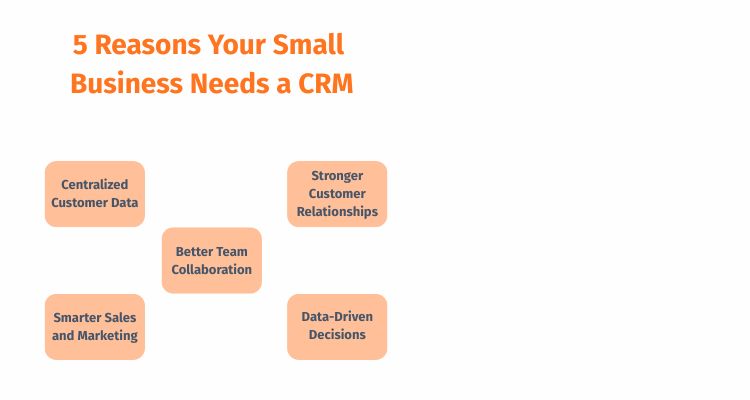
At its core, a CRM is software that helps businesses organize, track, and manage all interactions with current and potential customers. As CRM expert Paul Greenberg emphasizes in “CRM at the Speed of Light”, it’s about building a system focused on the customer. For a small business, this translates to tangible benefits:
- Centralized Data: All contact info, communication history, and deal status live in one place.
- Improved Sales Process: Visualize your pipeline, track leads, and ensure timely follow-ups.
- Better Customer Service: Understand customer history for personalized support.
- Scalability: Provides the foundation to manage growth, as discussed by Geoffrey Moore in “Crossing the Chasm”.
- Data-Driven Decisions: Reporting helps understand what’s working.
Key CRM features for small business success
While CRMs offer countless features, small businesses should focus on these essentials:
- Contact Management: Central customer/lead database.
- Sales Pipeline Visualization: Tracking deals through stages.
- Task & Activity Tracking: Scheduling follow-ups, calls, and meetings.
- Basic Email Integration/Marketing: Sending/tracking emails; simple automation.
- Reporting & Dashboards: Basic analytics on sales, pipeline, and activities. Provide views relevant to different stakeholders (Sales, Management).
- Integrations: Connecting with essential tools (email, calendar, accounting).
Important Considerations (Beyond Basic Features):
- Ease of Use & Team Adoption: Is the interface intuitive? Even the best CRM fails if the team doesn’t use it. Evaluate training/onboarding resources required for staff. How easily can different roles (sales, service, manager) learn and adopt the system?
- Scalability & Scope Creep: Can the CRM grow with you? Be wary of scope creep – needs expanding over time, leading to unexpected costs. Choose systems with clear pricing tiers and modular features.
- Integration, APIs & Future Flexibility: Does it just connect basic tools, or does it offer open APIs for custom connections? Consider its underlying network architecture – can it integrate with future systems like a Customer Data Platform (CDP) or ERP as you scale? Architectural flexibility is key for long-term value.
- Pricing: Does the cost fit your budget? Are the tiers clear?
- Data Privacy: Is it GDPR/CCPA compliant?
- Vendor Lock-in: How easily can you export your data if you need to switch?
Our methodology: How we chose the top 10
To provide an objective list, we relied primarily on G2.org’s real-time data for the Small Business segment (companies ≤ 50 employees). We focused on CRMs with high Market Presence and strong User Satisfaction scores within this segment. The list reflects tools actively used and well-regarded by small businesses today.
The top 10 CRM tools for small businesses (Compared)
Here is our breakdown based on G2 data and SME-focused features:
(Note: Order/specific CRMs may fluctuate based on real-time G2 rankings as of late 2025)
- HubSpot CRM
- Overview: Excellent starting point, known for its powerful free CRM and scalability.
- Key Features: Robust free tier, contact management, pipeline tracking, email marketing, and strong integrations.
- Pros (G2): Very easy to use, generous free plan, scales well with paid Hubs.
- Cons (G2): Paid plans escalate quickly, and advanced features need higher tiers.
- Pricing: Free plan; Sales Hub Starter ~$15/user/month.
- Zoho CRM
- Overview: Broad suite with an affordable, feature-rich CRM core.
- Key Features: Comprehensive lower tiers, customizable, and integrates well within the Zoho ecosystem.
- Pros (G2): Great value, highly customizable, wide feature range.
- Cons (G2): Can feel overwhelming, interface less modern to some.
- Pricing: Free plan (3 users); Standard ~$14/user/month.
- Salesforce Sales Cloud (Essentials)
- Overview: Small business version of the leading CRM platform.
- Key Features: Strong contact/lead management, customizable reporting, good mobile app. Known for extensive integration potential via AppExchange (good API flexibility).
- Pros (G2): Scalable, strong core sales features, large app ecosystem.
- Cons (G2): Can be complex for small teams, Essentials tier limited, and higher cost. Potential for scope creep.
- Pricing: Essentials ~$25/user/month.
- Freshsales (by Freshworks)
- Overview: Focuses on ease of use, built-in phone/email for sales teams.
- Key Features: Integrated phone/email, AI lead scoring, visual pipeline, simple UI.
- Pros (G2): User-friendly, good for sales activity tracking, good value. Generally, easy onboarding.
- Cons (G2): Weaker marketing automation, limited non-Freshworks integrations.
- Pricing: Free plan; Growth ~$15/user/month.
- Pipedrive
- Overview: Highly sales-focused, designed around pipeline visualization.
- Key Features: Excellent pipeline view, activity prompts, simple interface, and good integrations.
- Pros (G2): Intuitive pipeline, easy setup/use, effective sales focus. Good API support.
- Cons (G2): Limited marketing features, can get pricey with add-ons.
- Pricing: Essential ~$14/user/month.
- Monday Sales CRM
- Overview: Built on the flexible Monday.com work OS, highly customizable.
- Key Features: Customizable workflows, visual dashboards, and integrated project management.
- Pros (G2): Extremely flexible, good for existing Monday users, visually appealing.
- Cons (G2): Requires significant setup; user block pricing can be awkward. May require more internal training.
- Pricing: Starts ~$10/user/month (min 3 users).
- ActiveCampaign
- Overview: Marketing automation powerhouse with a solid integrated CRM.
- Key Features: Top-tier marketing/email automation, lead scoring, CRM. Good integration capabilities.
- Pros (G2): Best-in-class automation, great for email-heavy businesses.
- Cons (G2): CRM is less central than sales tools, and complex to master.
- Pricing: Lite plan ~$29/month (bundle).
- Insightly
- Overview: Combines CRM with project management, good for service businesses.
- Key Features: Integrated project management, relationship linking, customizable dashboards.
- Pros (G2): Good CRM + project combo, flexible linking.
- Cons (G2): The Interface feels dated to some; the mobile app needs improvement.
- Pricing: Plus plan ~$29/user/month.
- Keap (formerly Infusionsoft)
- Overview: Targets established SMEs/service providers; strong on automation, invoicing.
- Key Features: Robust automation, appointment scheduling, invoicing/payments.
- Pros (G2): Powerful automation for complex workflows, good for service businesses.
- Cons (G2): Steeper learning curve, higher starting price. Requires a solid onboarding plan.
- Pricing: Pro plan ~$159/month (2 users).
- Less Annoying CRM
- Overview: Simple, straightforward CRM for very small teams.
- Key Features: Extremely simple UI, contact management, calendar, and basic pipeline.
- Pros (G2): Very easy to learn/use (fast onboarding), affordable flat pricing, great support.
- Cons (G2): Lacks advanced features, automation, and limited integrations (weak API flexibility).
- Pricing: Flat $15/user/month.
CRM Comparison Matrix for Small Business
| CRM | Free Plan? | G2 Ease of Use (SB) | Core Sales Features | Basic Marketing Automation | Starting Price (approx.) | Best For |
| HubSpot CRM | ✅ | 9.2/10 | ✅ | ✅ | Free / $15 user/mo | Startups, Scalability, Free Option |
| Zoho CRM | ✅ | 8.7/10 | ✅ | ✅ | Free / $14 user/mo | Value for Money, All-in-One Suite |
| Salesforce Essentials | ❌ | 8.8/10 | ✅ | Limited | $25 user/mo | Scalability, Core Sales Power |
| Freshsales | ✅ | 9.1/10 | ✅ | ✅ | Free / $15 user/mo | Ease of Use, Integrated Phone/Email |
| Pipedrive | ❌ | 9.2/10 | ✅ | Limited | $14 user/mo | Visual Pipeline Management, Sales Focus |
| Monday Sales CRM | ❌ | 8.9/10 | ✅ | ✅ | $10 user/mo (min 3) | Customization, Existing Monday Users |
| ActiveCampaign | ❌ | 8.7/10 | ✅ | ✅✅ | $29 /mo (bundle) | Advanced Marketing Automation Needs |
| Insightly | ❌ | 8.6/10 | ✅ | Limited | $29 user/mo | CRM + Project Management Integration |
| Keap | ❌ | 8.5/10 | ✅ | ✅✅ | $159 /mo (2 users) | Service Businesses, Advanced Automation |
| Less Annoying CRM | ❌ | 9.5/10 | Basic | ❌ | $15 user/mo | Simplicity, Very Small Teams |
“How you gather, manage, and use information will determine whether you win or lose.” – Bill Gates
How to choose the right CRM for your business

With so many options, focus on these key steps:
- Define Your Needs & Problems: What specific issues are you trying to solve? List your top 3-5 must-have features vs. nice-to-haves.
- Set Your Budget: Determine a realistic monthly/annual budget per user. Factor in potential setup, training, and integration costs.
- Prioritize Ease of Use & Adoption: For SMEs, intuitive software requiring minimal training is crucial. Check G2 Ease of Use ratings and consider your team’s tech comfort level.
- Consider Scalability & Future Integration: Will this CRM grow with you? Evaluate its higher tiers, API flexibility, and potential to connect with future systems (like a CDP). Be mindful of scope creep.
- Check Essential Integrations: Does it connect easily with tools you already use (email, calendar, accounting)?
- Use Free Trials: Shortlist 2-3 contenders and get hands-on. Involve key stakeholders (e.g., sales lead, admin staff) in the trial.
Final Thoughts: Your Next Step to Growth
Choosing your first or next CRM is a critical decision. It’s the system underpinning your customer relationships and sales processes. While the “best” CRM depends on your specific needs, budget, and team, using objective data from G2 and considering the deeper implementation factors provides a solid foundation.
By carefully evaluating your requirements, including ease of adoption, integration potential, and scalability, against the top contenders outlined here, you can select a tool that actively helps you build better relationships and drive growth.
Ready to streamline your customer management and empower your small business? Don’t let valuable customer data slip away. Use this guide to short-list your top CRMs, explore their free trials, and take the definitive step towards smarter sales and stronger customer relationships today. Define how this tool will help achieve your goals in your Business Plan. Download our Business Plan Template Now!
Frequently asked questions (FAQs)
- How hard is it to migrate CRM data?
It varies. CSV imports from spreadsheets are usually simple. CRM-to-CRM migration can be complex. Plan for potential downtime, data cleanup, and potentially professional help. - Do I need CRM if I’m a solopreneur?
It’s still valuable for organizing contacts, tracking leads, and automating follow-ups. Many free or low-cost plans are suitable for individuals. - What’s the difference between CRM and project management software?
CRM focuses on customer relationships/sales. Project management focuses on tasks/deadlines for projects. Some tools combine elements. - How do I ensure CRM data privacy?
Choose reputable, compliant (GDPR/CCPA) vendors. Understand their security, control user permissions, and have clear internal/external privacy policies. - How much training does a CRM require?
It depends heavily on the CRM’s complexity and your team’s tech skills. Simple CRMs might take hours; complex ones can require days or weeks of training and dedicated internal support. Factor this into your decision.
References
- CRM at the Speed of Light: Social CRM Strategies, Tools, and Techniques for Engaging Your Customers. (4th Ed.). Greenberg, Paul. [https://www.amazon.com/CRM-Speed-Light-Fourth-Strategies/dp/0071590455] (Accessed October 2025).
- G2 CRM Software Grid for Small Business. (Updated Regularly). G2.org. [https://www.g2.com/categories/crm/small-business] (Accessed October 2025).
- CRM ROI Calculation. (Updated Regularly). Nucleus Research. [https://nucleusresearch.com/] (Search for CRM ROI reports) (Accessed October 2025).
- The Ultimate List of CRM Features & Integrations for the First-Time Buyer. (2024). HubSpot. [https://blog.hubspot.com/sales/the-ultimate-first-time-crm-buyers-guide] (Accessed October 2025).
- State of Sales Report. (Updated Regularly). Salesforce. [https://www.salesforce.com/resources/research-reports/state-of-sales/] (Accessed October 2025).
- (Links to individual CRM product pages for the Top 10) – e.g., HubSpot.com, Salesforce.com/essentials, etc. (Accessed October 2025).